
When to leave, in my Omarchy bar
Every Sydney commuter knows the ritual. You’re deep in something, you glance at the clock, you pick up your phone, unlock it, open TripView, wait for it to load, do the walking maths in your head, and then decide whether you can finish this one last thing.
The answer was always going to be on my phone. But I’m on my laptop, and my laptop runs Omarchy. The bar is right there.
So I asked a different question. Not “when does the train leave?” but “when do I need to leave?”
Leave in, not departs at
The whole plugin is built around one number: departure time minus your walk to the stop. The bar shows a small Transport mark. Hover and you get the countdown. Open it and the hero says Leave in 4 min, with a strip underneath showing how much of your window is already gone.
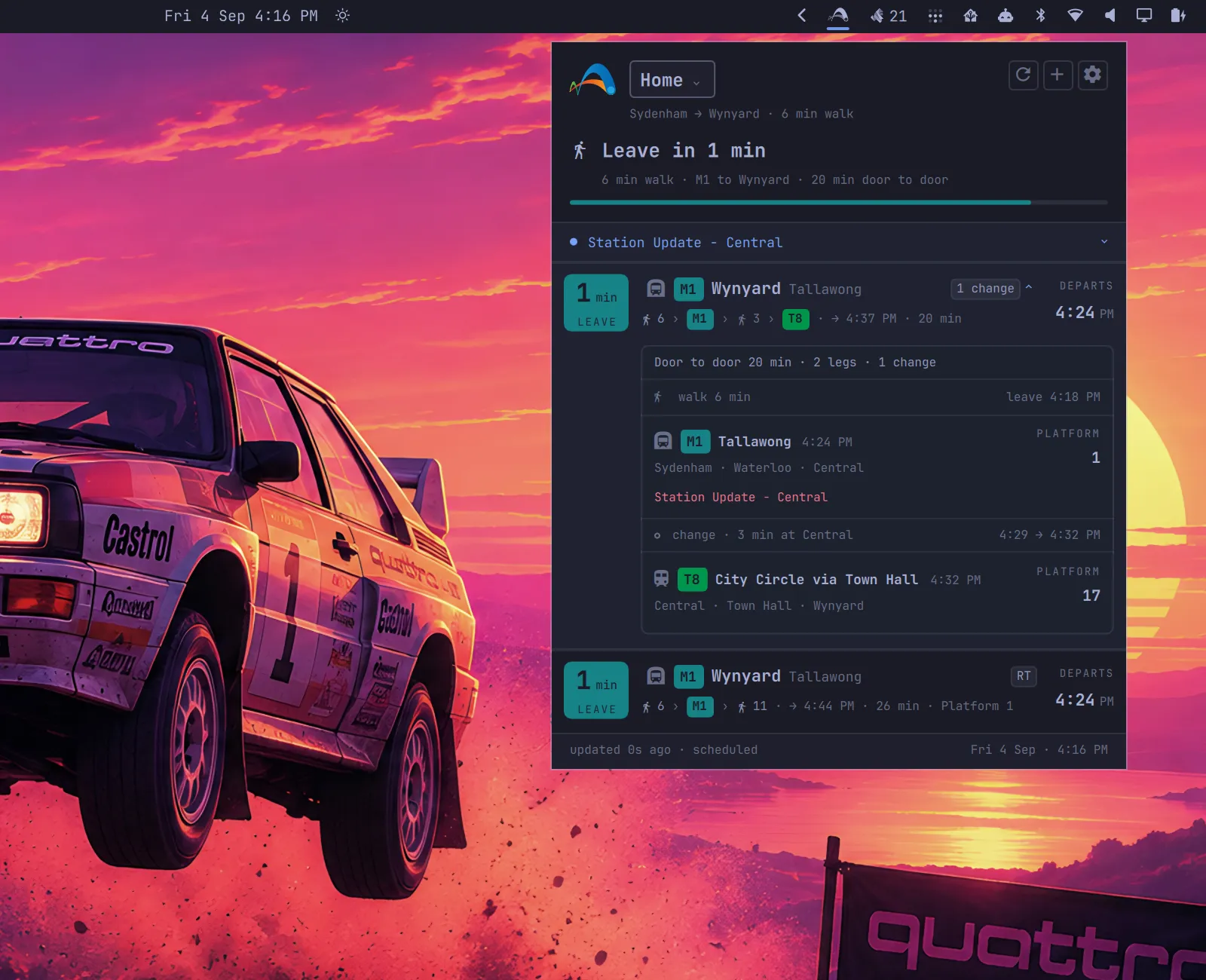
Under that is a board that borrows the station’s own language. Line colour badges, platforms, realtime pills, “1 change”. Expand a trip and it turns into a mini indicator board: walk, ride, change, ride, with every platform and clock you need. Anything you can’t catch, or that a later service beats anyway, goes grey and stays put, so a gap in the list is explained rather than hidden. TripView users will recognise that one.
I wrote a design brief before any UI work, and the first rule was that the answer has to be readable in under a second, from across the desk, without reading a sentence. Every screen got judged against that.
Door to door
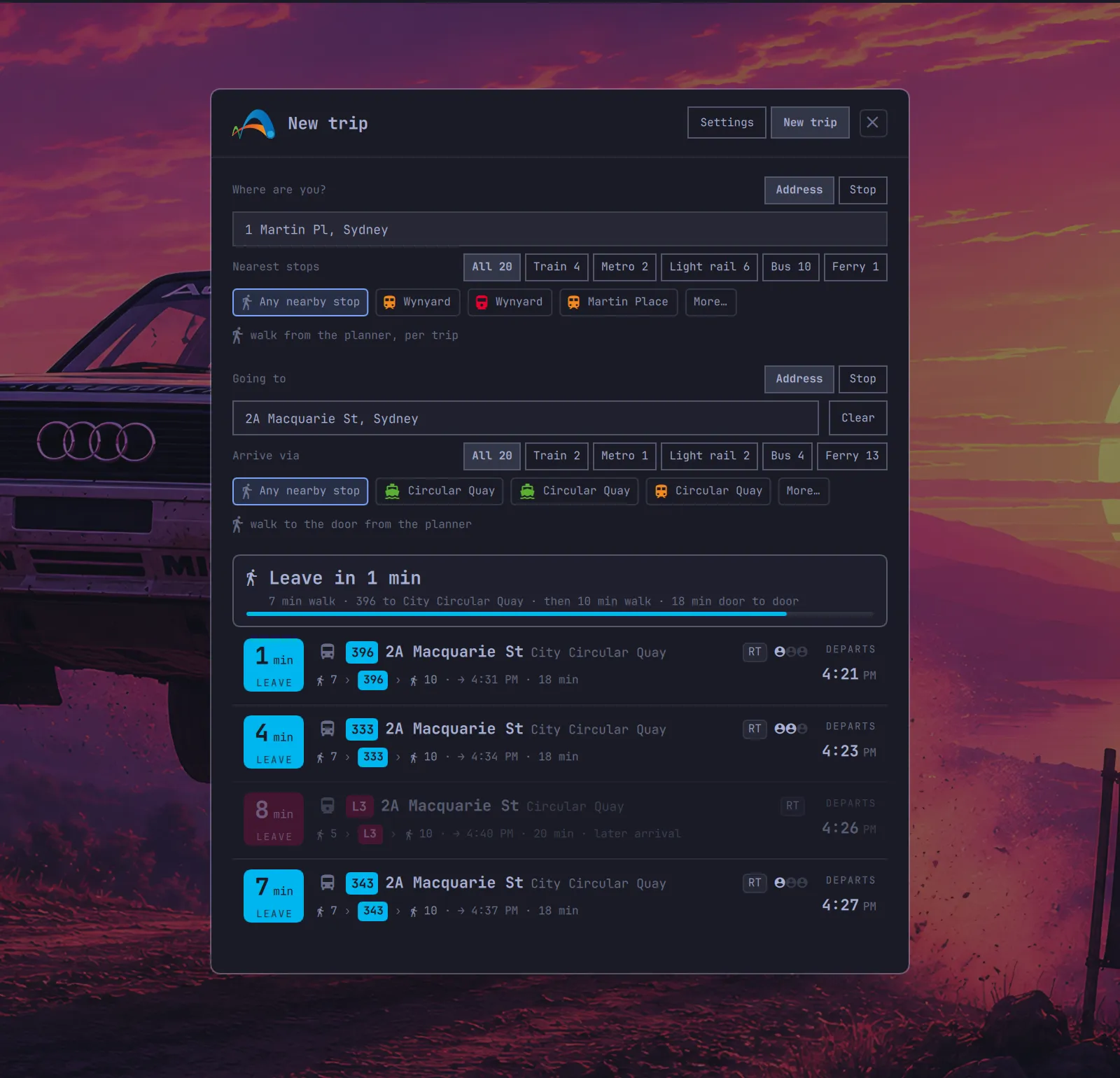
Trips can start and end at a stop or an address. Give it your street and it finds the nearby stops and estimates the walk. Choose Any nearby stop and the bus, the train and the light rail from your front door all compete on one board, each with its own walk. Give it a destination address and the final walk to the door is part of the trip.
A few other things I didn’t know I wanted until I had them:
- Wi-Fi switching. Tie a trip to an SSID and the board flips to the office trip when you’re at the office.
- Leave-now notifications, so you don’t have to look at all.
- Crowding, shown as little people icons when live vehicle data exists. Buses and Metro are good, trains are patchy, light rail has none.
- Disruption alerts attached to the leg they affect, not dumped at the top.
It’s trains, metro, buses, ferries and light rail, all from the free TfNSW Open Data APIs. You bring your own key, it lives in the system keyring, and nothing is hosted by me. There’s a demo mode if you want to look before you sign up.
Install
omarchy plugin add https://github.com/vichong/omarchy-tfnsw-departures.git --enable --yesThen open settings, paste your API key, and add a trip. The README walks through getting a key on the free Bronze plan.
Built on open data
Transport data comes from Transport for NSW under CC BY 4.0, and their open data team deserves real credit for publishing feeds this good. The Transport mark belongs to TfNSW and keeps its own non-commercial licence. TripView set the standard for how a Sydney departures app should feel, and I borrowed from it shamelessly. This is an independent project, not affiliated with Transport for NSW.
Now I close the laptop when the bar tells me to. Most days, anyway.